
If you understand how to set the VGA mode and
access VGA memory then the next step is to learn
how you modify that VGA memory to get the results you want on the screen.
Each character (char) in that chunk of memory represents the colour
of one pixel on the screen, and you can change the colour of any pixel
by simply changing the value (to anything from 0 to 255) of the char that
represents that pixel.
Now, incase you're not familiar with the (x,y) coordinate system,
in order to define the position of a pixel on the screen you use two numbers:
x - the number of pixels over from the left of the screeny - the number of pixels down from the top of the screen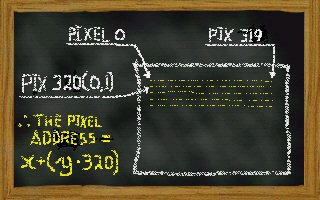 So the very top-left pixel on the screen would be at the
 (x,y) coordinate
(0,0) and the middle of a 320x200 screen would be (160,100)
VGA memory is a one-dimensional array, that means one long chunk of data. The way the video-card reads the video-memory for 320x200 mode is in 320 byte strips, one strip is read for each horizontal line on the screen. Therefore the first 320 bytes of VGA memory (byte #0 to # 319) holds the colours for each pixel on the top line of the screen. The second 320 (from byte #320 to #639) bytes would represent the second line and so on.
The address of an (x,y) pixel in video memory is often called the pixel-offset.
If you think about how the video-card reads the video-memory onto the screen,
finding the pixel-offset (1-dimensional address) of an (x,y)
coordinate (2-dimensional) comes down to a very simple formula:
pixel_offset = x + (y * 320)
Since every time we want to get the address of the start of a line of
pixels we jump in 320 byte chunks, so by multiplying the y value
by 320 we find the left-most pixel of the desired 'horizontal-line' on the screen.
Then by adding the x value to this address we move the desired
pixel-offset over to the right x bytes.
Here's some example code for you to try, it should put a red pixel in the
center of your screen in 320x200 VGA mode.
You should be able to copy that text directly into your own .C or .CPP file and
compile it to see it for yourself!
#include < conio.h >
#define RED 4 //The default VGA palette defines 4 as red

//Create a pointer to VGA video-memory
char far *screenptr = (char far*) 0xA0000000L;

//This function puts a 'colour' pixel at (x,y)
//It relies on 'screenptr' as the address of the start of video memory
void putPixel(int x,int y,char colour) {
  screenptr[x + (y*320)] = colour; //put the pixel using the x+y*320 formula
}

//Calls the BIOS to set the specified video mode
void setVideoMode(char mode) {
  asm mov ah,0
  asm mov al,[mode]
  asm int 10h
}

void main(void) {

  int x = 160;        //Lets make variables to hold our coordinate values...
  int y = 100;        //...for the center of the screen (160,100)
  char colour = RED;  //And the colour RED sounds good

  setVideoMode(0x13); //Set 320x200 VGA mode (0x13)

  putPixel(x,y, colour); //Put the pixel at (x,y) of 'colour'

  getch();            //Wait for keypress

  setVideoMode(0x03); //Set DOS text-mode before exiting
}
(Let me know
if you have troubles with it)